03/31/08 : 2 comments
Create, and sort, a list
To elaborate on the problem, my company wanted our users to be able to build a personalized list (by selecting from a list of existing options), then be able to sort/reorder that list any way they wanted. For this problem, I considered two possible solutions. The first is essentially the same as the original double list pattern combined with a wizard/interview pattern, while the second incorporates drag and drop functionality. Let’s examine both options in more detail.
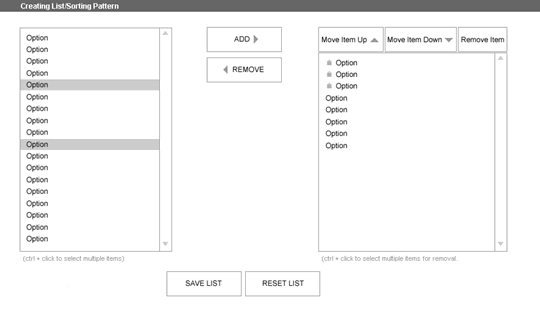
Solution I: Enhanced double list
To add an item to their list, a user selects the option they want in step one, then clicks the add button in step two. Step three is where they can make changes to their list. To remove an item, they select the option they don’t want, then click the remove item button. To move an item up in their list, they select the option they want to move, then click the move item up button. To move it down they click the move item down button. Lastly, in step four, they can save or clear the list. (You can also monkey with the prototype here if you wanted.)
Solution II: Drag and drop
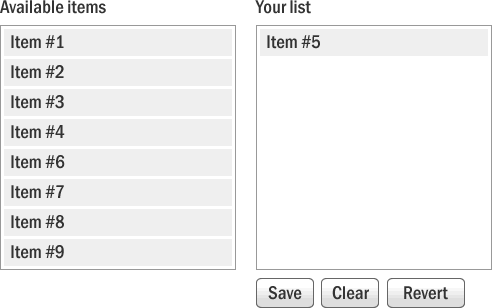
To add or remove an item, a user selects the option they do, or don’t, want, and while holding down the mouse button, drags the item over to the appropriate input area, and releases the mouse button. To move an item up or down in the list, they select an option, and while holding down the mouse button, drags the item up or down the list to where they want it to live, and releases the mouse button. Visual indicators should be employed so the user is confident the item will appear where they want it. Typically this would involve items “moving out of the way” to make room for the new item.
Which is the better solution?
Since list creation this robust rarely exists on the web, it’s likely most users have never encountered either of these patterns. I’ve yet to find any real data on which would be best. Personally, I think solution II would be the easiest to use. (If you’ve ever used an O/S in the last 10 years you’re very familiar with that functionality.) Though I realize it’s very difficult to code, and wouldn’t work if the user had javascript disabled. Anyhow, in the end they choose solution one, the enhanced double list.
So which do you think is the best option? Would you change anything to make either of them better?